
Insight Miner
Explore how AI transforms unstructured data
How Insight Miner Works
The Insight Miner is a powerful feature of Alterna Copilot that transforms complex data into actionable intelligence. It analyzes your selected data points and automatically generates concise, insightful summaries that highlight key trends, anomalies, and patterns. By extracting meaningful information from your reports, the Insight Miner helps you quickly understand what's driving changes in your data without manual analysis. This time-saving tool enables you to make data-driven decisions faster, identify opportunities you might otherwise miss, and communicate findings effectively with your team—turning raw data into strategic advantage with just a few clicks.
Minimum Data Requirement
Insight Miner requires a minimum of 25 reviews to generate a summary. With fewer than 25 reviews, the system cannot produce reliable insights. This ensures that the AI has sufficient data to identify meaningful patterns and deliver accurate, actionable summaries.
How to Generate Summaries with Insight Miner
After uploading your data to Alterna or getting data from ready integrations, navigate to the Reports section.
Create a customized report by selecting your preferred filters.
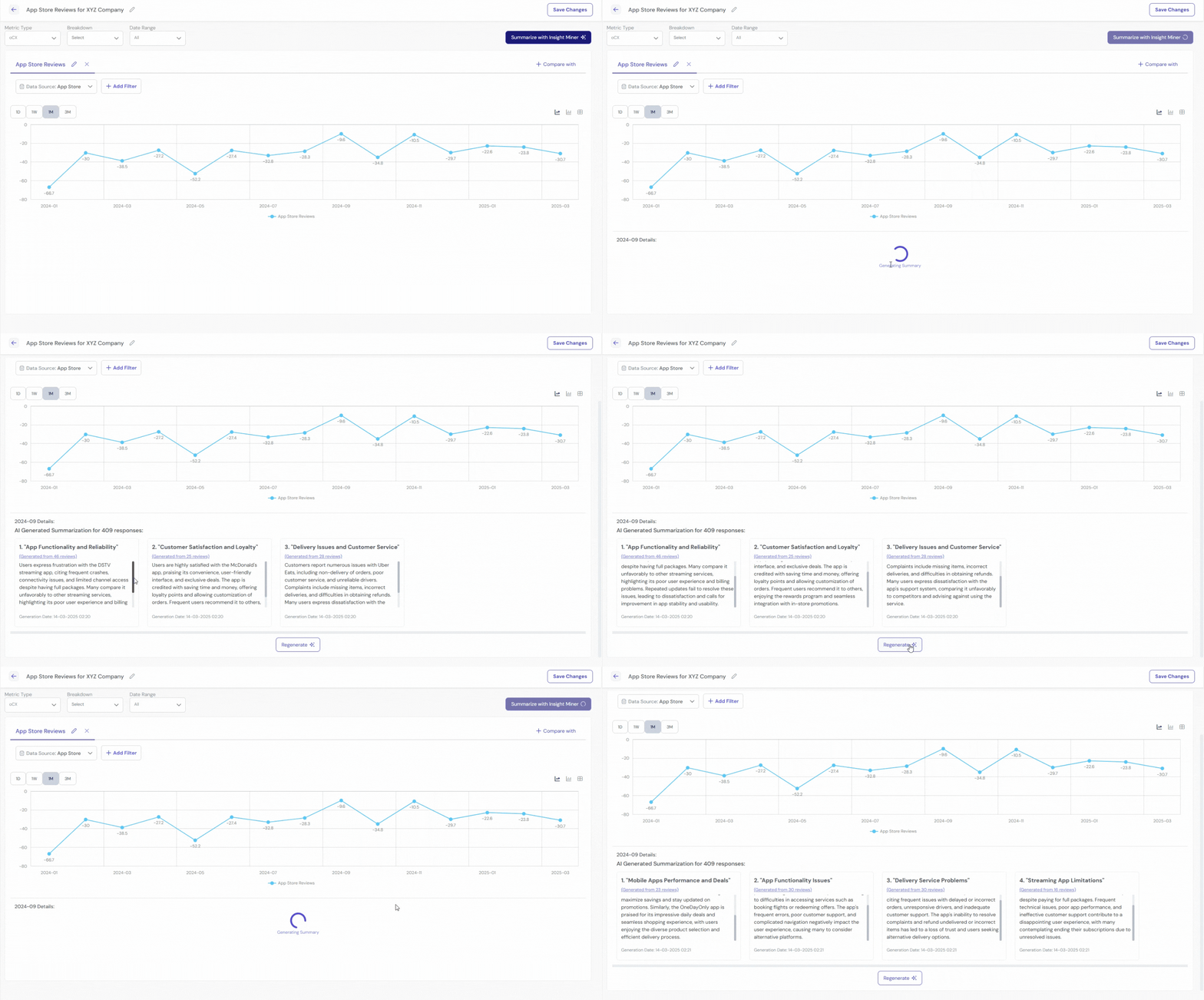
Click on a specific point or bar in the graph you'd like to analyze.
Select "Generate Summary" to begin the analysis.
Wait a few seconds for your summaries to be prepared.
If the results don't meet your needs, click "Regenerate" to create new summaries.
How to Generate General Summaries with Insight Miner
After uploading your data to Alterna or getting data from ready integrations, navigate to the Reports section.
Create a customized report by selecting your preferred filters (or leave filters unset for all data).
Click the dark blue "Summarize with Insight Miner" button at the top of the page.
This will generate a general summary of all your reviews (if no specific time interval or filters are applied).
Wait a few seconds for your summaries to be prepared.
If the results don't meet your needs, click "Regenerate" to create new summaries.

If you have any questions email us at contactus@alternacx.com
Get a Personalized Demo with Your Data!
Join category‑leading companies and start driving growth, reducing churn, and building loyalty with Alterna's AI technology!
Gain insights into your company's oCX score and compare it with those of your competitors.
Discover the specific areas where your company struggles and uncover opportunities for growth.
Use insights to strengthen your brand's reputation and increase positive customer sentiment.
See Alterna CX In Action
By submitting, you agree to Alterna's privacy policy and agree to receive emails from Alterna CX. You can opt out anytime.